 Claude
 Codex
 Alpaca
 IBKR
 Telegram
 Python
 Yahoo Finance
Quick Answer
The AI Pathways Claude trading bot course is a legitimate flex on the engineering side and a cap on the money side. Across 3 hours and 7 minutes, the creator walks through a real build: project planning, asset research, backtesting with costs and slippage, keep-or-kill rules, kill switches, and broker connection to Alpaca. What he never shows is a verified live track record. You'll end up with working code and an unproven edge, which are two very different things.
That gap is the whole story. Code is cheap now. Edge still isn't.
What Does AI Pathways Actually Claim?
The claim is that a complete beginner can go from no code and no strategy to a fully automated bot that trades a real account on its own. His words, roughly at the open: by the end, you go "from basically zero" to "a fully automated trading bot just like this one" (0:00). It studies how each asset moves, picks strategies that fit, tests them, layers AI analysis on top, places orders daily, and texts him updates.
The video went up November 7, 2026, and had pulled 98,112 views and 1,638 likes by November 17. The prompts and source code live behind his paid community, which is the business model. Fine. Just know the free video is the demo and the prompts are the product.
The receipts he does show
He shows a lot more on screen than most Claude trading bot videos bother with:
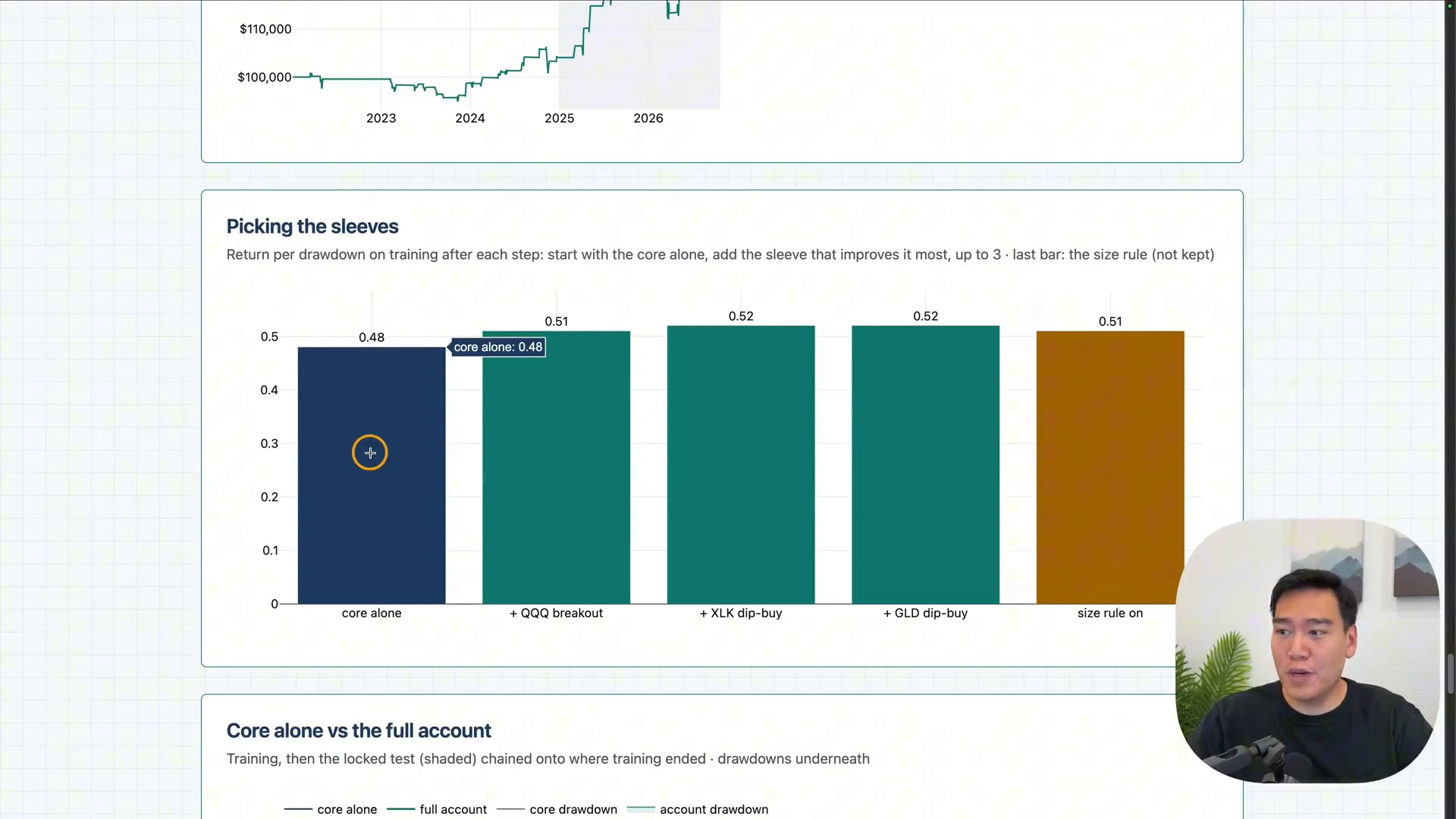
- Sleeve selection by return per drawdown (100:24), a chart comparing the core-only portfolio against the core plus added strategy "sleeves," measured by return divided by worst peak-to-trough loss.
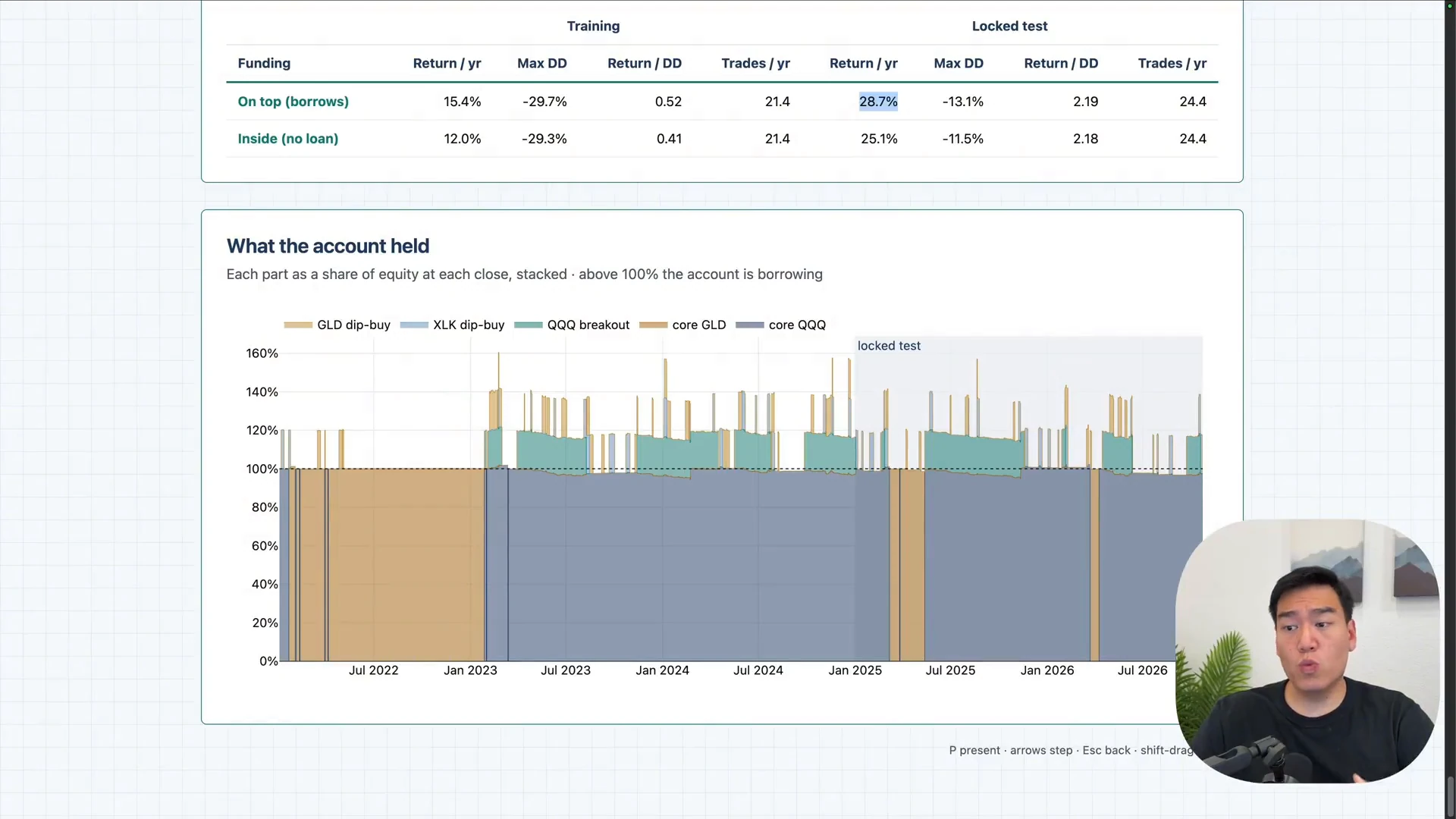
- Equity and holdings over time (101:41), what the account actually held, period by period.
- A daily regime dashboard (125:11), the screen that tells the bot whether the market is in an uptrend, a downtrend, or a choppy tape.
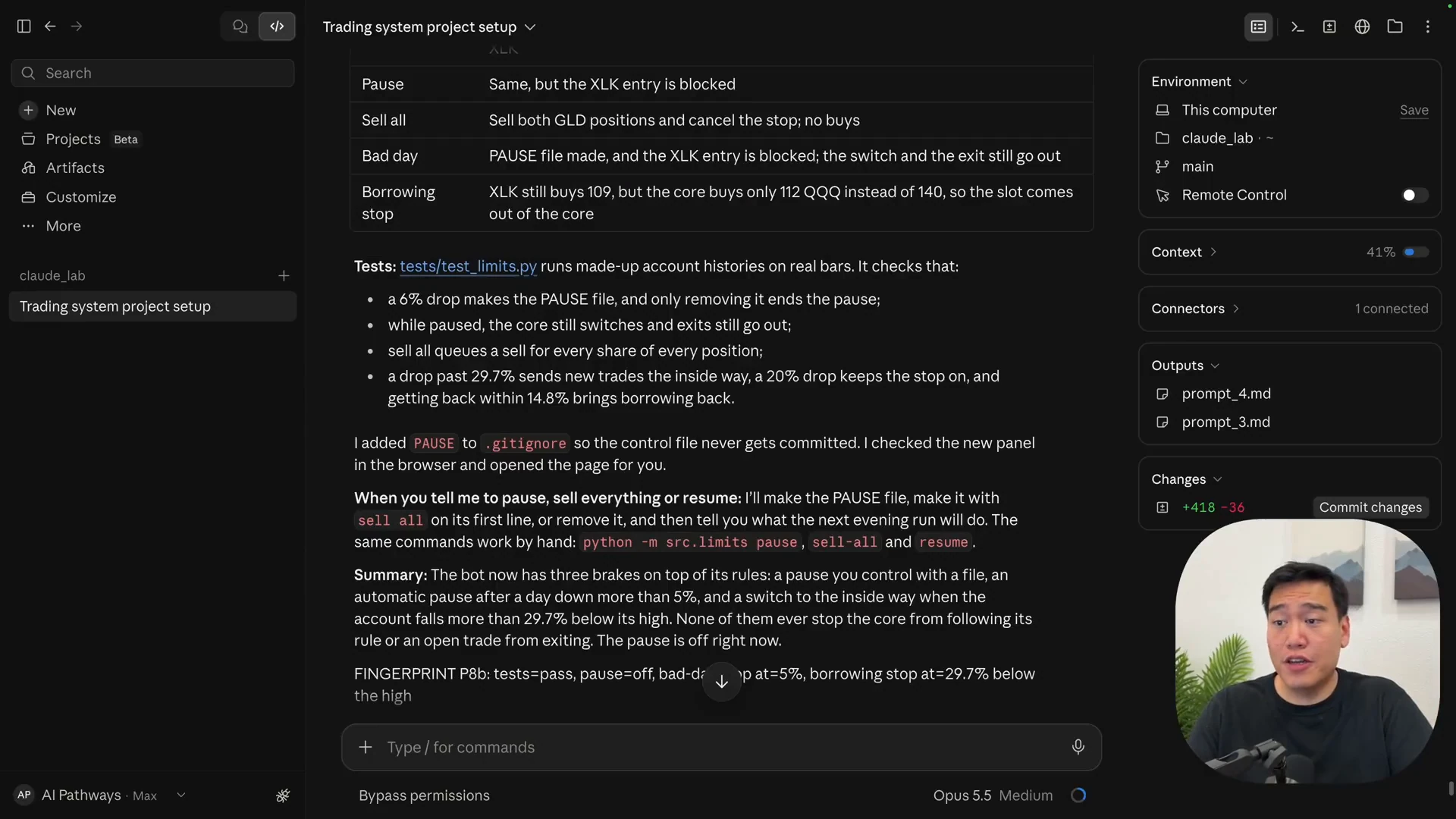
- Live pause and kill-switch tests inside a Claude Code session (131:07), he deliberately triggers the stop conditions to prove they fire.
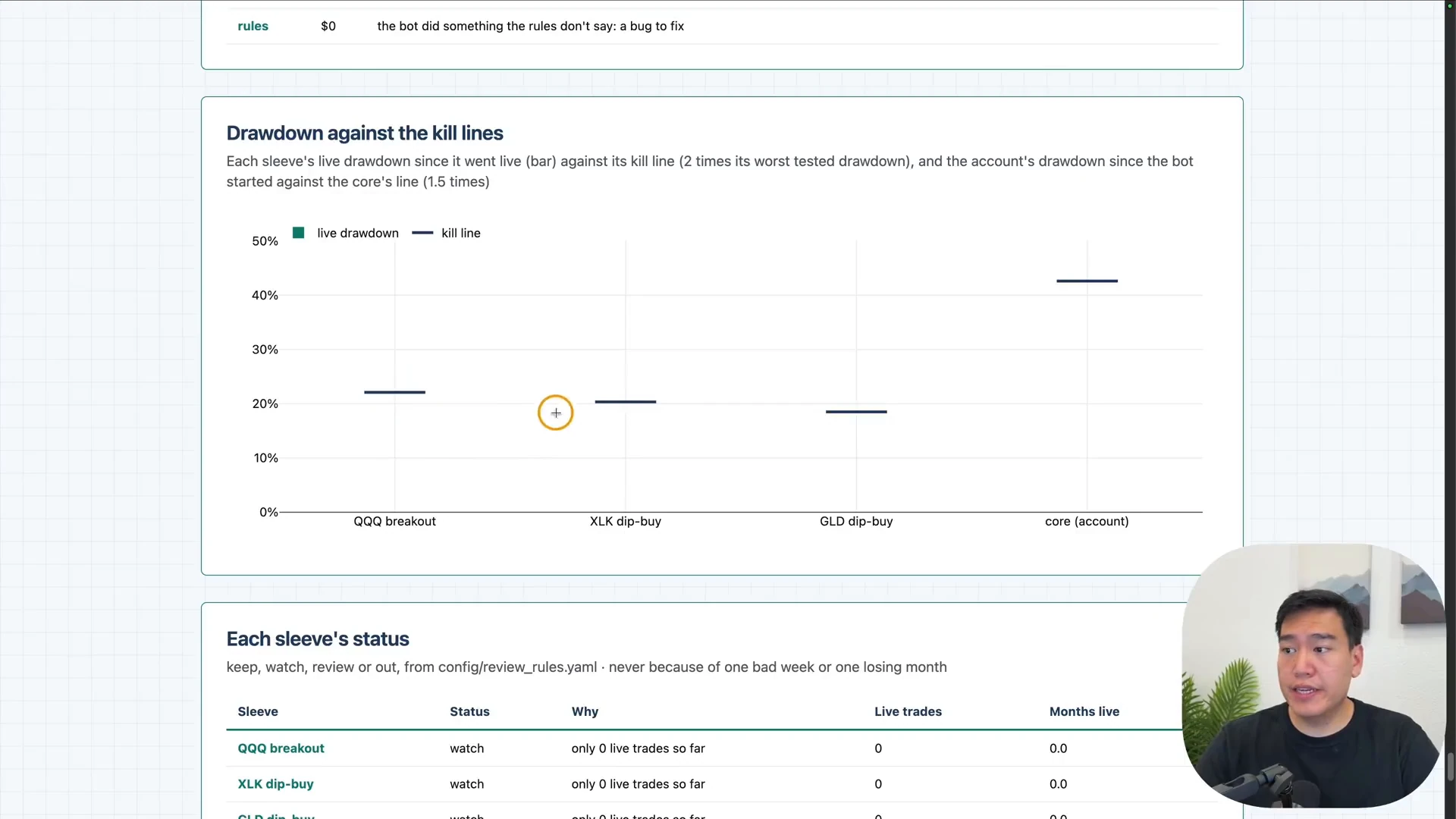
- Drawdown plotted against the kill lines (151:13), where the account sat relative to the levels that shut it down.
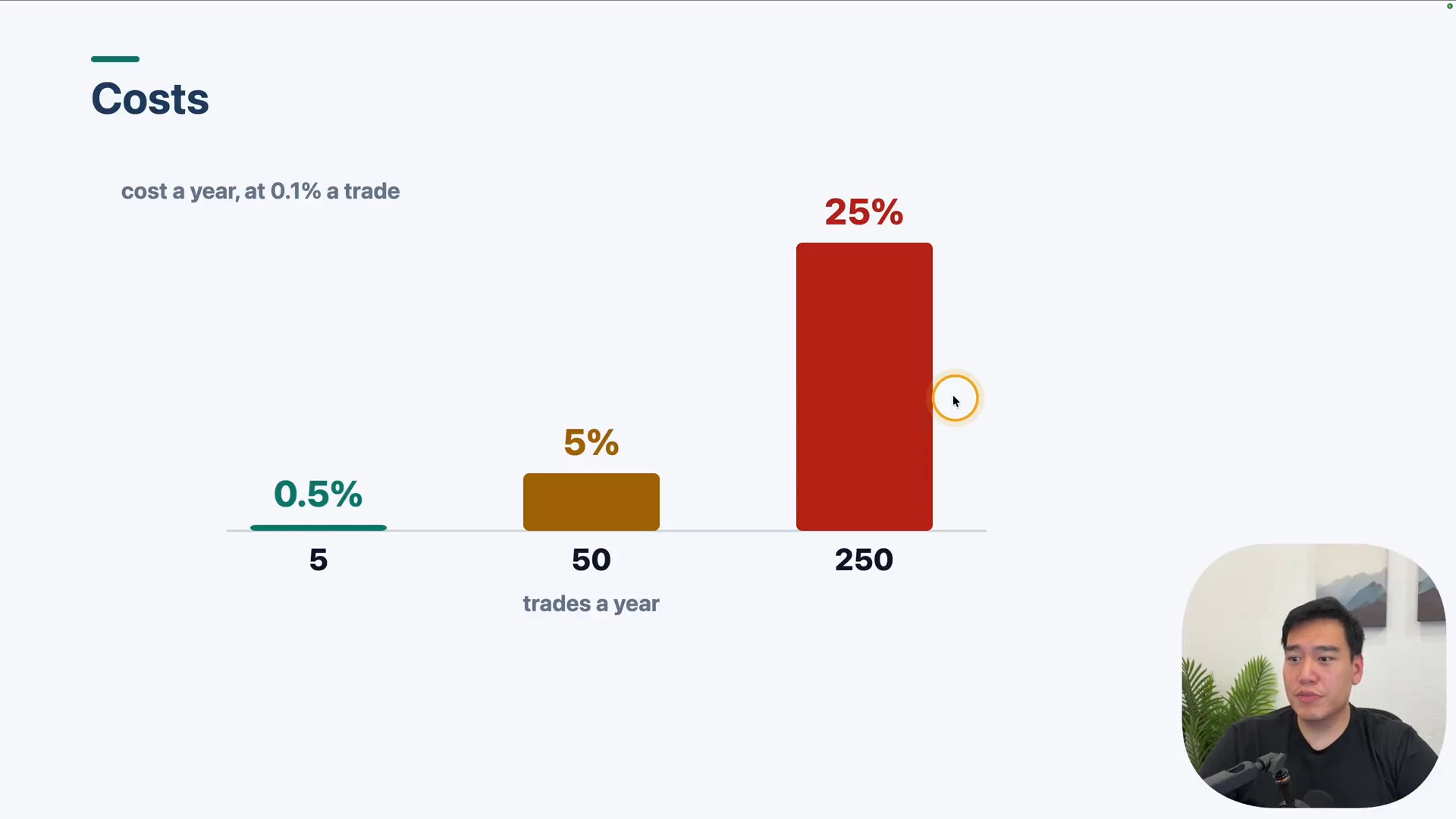
- Cost drag at 0.1% per trade across 5, 50 and 250 trades a year (175:21), the slide most trading content skips entirely.
He's specific about mechanics, too. On slippage: place an order at $35.13 and "the price could jump up to $36.20, and that's where your order gets filled" (40:14). On the keep-or-kill bar, he wants a profit factor of at least 1.3, meaning "the winners made 30% more than the losers lost" (90:39).
The receipt he doesn't show
No audited live P&L. No brokerage statement. No third-party verification of a single dollar. He states plainly that it's educational content, not financial advice. Credit where due, that disclosure is more than most. But a backtest and a paper account aren't a track record.
Watch the original here: How To Actually Build an AI Trading Bot With Claude.
How Do You Build a Claude Trading Bot Step by Step?
You build a Claude trading bot in six stages: set up the tools, write a build plan before any code, research how each asset actually moves, backtest with real costs, add hard keep-or-kill rules and kill switches, then paper trade for at least 30 days before a single live dollar goes in. Skip stage two and you'll spend your weekend debugging a bot that never had a thesis.
The order matters more than the code. Here's the full build.
What you need first: Claude Code, a broker API (Alpaca or IBKR) and market data
Three accounts and one folder. That's the setup.
Claude Code is Anthropic's command-line coding tool. It reads and writes files in a folder on your machine, runs scripts, and fixes its own errors. You talk to it in plain English; it edits real files. No coding background required, but you do need to read what it wrote before you run it.
A broker with an API. Alpaca is the usual pick for beginners because paper trading is free and the API is simple. Interactive Brokers (IBKR) is more powerful and more painful to configure. The video notes Alpaca needs at least $2,000 in the account for margin (159:39), which matters if your strategy assumes borrowing.
Market data. Free daily bars from Yahoo Finance handle most swing strategies. Intraday is where you pay.
One rule before anything else: your API keys never go inside the code. Claude generates a .env.example template for exactly this (18:58). Your real keys live in a .env file that never leaves your machine and never gets committed anywhere. Anthropic itself ships filesystem and network sandboxing for Claude Code to stop prompt-injected code from touching sensitive files or phoning out to servers you didn't approve. Use it. Start with paper credentials only.
Also worth checking: Anthropic retired the Claude Sonnet 4.5 API on November 30, 2026. If any prompt or script you copy hard-codes a model name, swap it and re-test before it silently breaks.
Plan before code: the build list Claude follows
The single best idea in the course is boring and it's the reason the build works. He calls it the "exact version" (13:52): write the full plan first, as a numbered list of steps with explicit instructions, then have Claude execute the list one item at a time.
Ask Claude for "a trading bot" and you get a plausible-looking blob you can't audit. Hand it a nine-step spec and you get components you can test individually.
Vibe-coding a bot is how you end up with 400 lines of Python you don't understand sending live orders at 9:31 a.m.
The build list in his system covers roughly: project scaffolding, data loading, asset research, strategy rules, backtest engine, validation checks, the AI layer, broker connection, and risk checks that run before every order (122:50). Each step gets its own test before the next one starts.
Practical takeaway: make Claude write the plan to a markdown file in the project folder, then reference that file in every follow-up prompt. It keeps the model from quietly redesigning your bot halfway through.
Step 1: study how each asset moves
Before any strategy, the bot profiles the asset. Does it trend or mean-revert? How violent is a typical down week? What's the average true range, the gap behavior, the volume pattern?
This is the step most beginners skip, and it's why they bolt a momentum breakout strategy onto a ticker that chops sideways for eleven months a year. The setup has to match the personality of the instrument.
In his build, this research drives an actual decision. He shows a stretch where the market was in a downtrend, cash returned about 2% a year, and every bond fund lost money because rates were rising and bond prices fall when rates rise (85:59). The research output picked QQQ as the core engine rather than defaulting to a bond hedge that would've bled.
Decision rule: if the asset research can't name a repeatable behavior in one sentence, don't build a strategy on it. Move to a different ticker.
Step 2: pick the sleeves and the allocation (70% core in his build)
The architecture is a core plus sleeves. The core holds most of the money and barely trades, which he describes as "something better than cash" (28:46). The sleeves are smaller, faster strategies layered on top: a dip buy, a breakout, a momentum rotation.
His split is 70% core, 30% sleeves. He notes you can run 50/50 if you want more risk, which is an honest way to say it, not a recommendation.
| Component | Allocation | Trades | Job |
|---|---|---|---|
| Core (QQQ in his build) | 70% | Rarely | Carry the return, survive drawdowns |
| Dip-buy sleeve | ~10% | Weekly-ish | Buy short-term weakness in an uptrend |
| Breakout sleeve | ~10% | Weekly-ish | Catch tight consolidation that resolves up |
| Cash / defensive | ~10% | On regime flip | Reduce exposure when the tape turns |
At (100:24) he shows the chart that justifies this: adding sleeves improved return per drawdown versus the core alone. That's the right metric. Raw return tells you nothing about whether you could've sat through the drawdown without panic-selling at the low.
Small-account edge case: he points out that with $20,000, a slot buys about eight shares of something (159:39). On a $2,000 account, fractional shares or cheaper tickers, and fewer sleeves. Four strategies on a tiny account is just transaction costs wearing a costume.
Step 3: backtest with real costs and slippage
A backtest without costs is a daydream with a chart attached. The build bakes in two frictions:
Commission and fees. Even at zero commission, there are regulatory fees, spreads, and borrow costs on margin.
Slippage. The price moves between your click and your fill. His example again: order at $35.13, filled at $36.20 (40:14). On a strategy targeting a 1% edge per trade, a 0.3% slippage haircut eats a third of it.
He also does something smart that almost nobody does: he tests the backtest engine itself. He plants a known edge in synthetic data, a signal that should produce about 1% per trade, then checks whether the engine finds roughly 1% minus costs (76:34). If the engine reports 4%, the engine is broken, not brilliant.
Common mistake: believing a backtest that shows a smooth 45-degree equity line. Real strategies have ugly stretches. If yours doesn't, you've either got a look-ahead bug or you've fit the model to the noise.
Two validation checks from the course are worth copying regardless of what you build:
- Locked test windows. Hold back a chunk of history the optimizer never sees, then test on it once. Once. Peeking repeatedly is just slow overfitting.
- Neighbor checks. Nudge each parameter up and down. If a 20-day lookback prints money and 18 and 22 both lose, you found a coincidence, not a strategy (90:39). Real edges are blurry at the edges.
Step 4: the keep-or-kill rules (profit factor of at least 1.3)
Write the rejection criteria before you see the results. Otherwise you'll negotiate with yourself.
His bar for a sleeve: profit factor of at least 1.3, gross wins divided by gross losses. The strategy has to make money in the locked window, and the neighbors have to make money too (90:39). Fail any of it, kill it. No "let's just tweak the stop a little."
A sensible kill list for a beginner build:
- Profit factor under 1.3 on out-of-sample data? Kill.
- Fewer than ~30 trades in the test? Not enough evidence. Kill or extend the window.
- Neighbors lose money? Kill.
- Max drawdown deeper than you'd sit through in real life? Kill, regardless of return.
- All the profit comes from two trades in March 2020? Kill.
In the discovery phase, Claude proposes strategies as explicit rules before testing anything, ticker, buy condition, sell condition, stop (94:18). Seeing the rules in plain English first is what lets a non-coder actually audit them. If you can't restate the rule to a friend in one breath, you don't understand what you're about to automate.
Step 5: kill switches, pause tests and drawdown lines
This is the part that separates a trading system from an expensive random number generator.
Two hard stops in his build:
- The 3% rule handles ordinary bad days by trimming risk.
- The 5% day. If the account drops more than 5% in one session, the bot writes a pause file, stops opening anything new, and messages him. Nothing restarts until a human says so (129:37).
And there's a step-nine risk check that inspects every single order against the limits before it goes out (122:50). Position size, exposure, concentration. The order gets blocked, not warned about.
The thing he does right that most builders skip: he tests the kill switches on purpose. At (131:07) you can watch him trigger pause and kill conditions inside a Claude Code session to confirm they actually fire. At (151:13) he plots live drawdown against those kill lines so you can see how close the system ran.
An untested kill switch is a comment in your code, not a risk control.
Do this before you go live: force the drawdown variable to a failing value and confirm the bot stops. Then confirm it stays stopped after a restart. Bots that forget they were paused are a known way to lose money twice.
Step 6: paper trade and read the daily regime dashboard
Paper trade for 30 days minimum. Longer if the market's been quiet, because a system that's never seen a red week hasn't been tested.
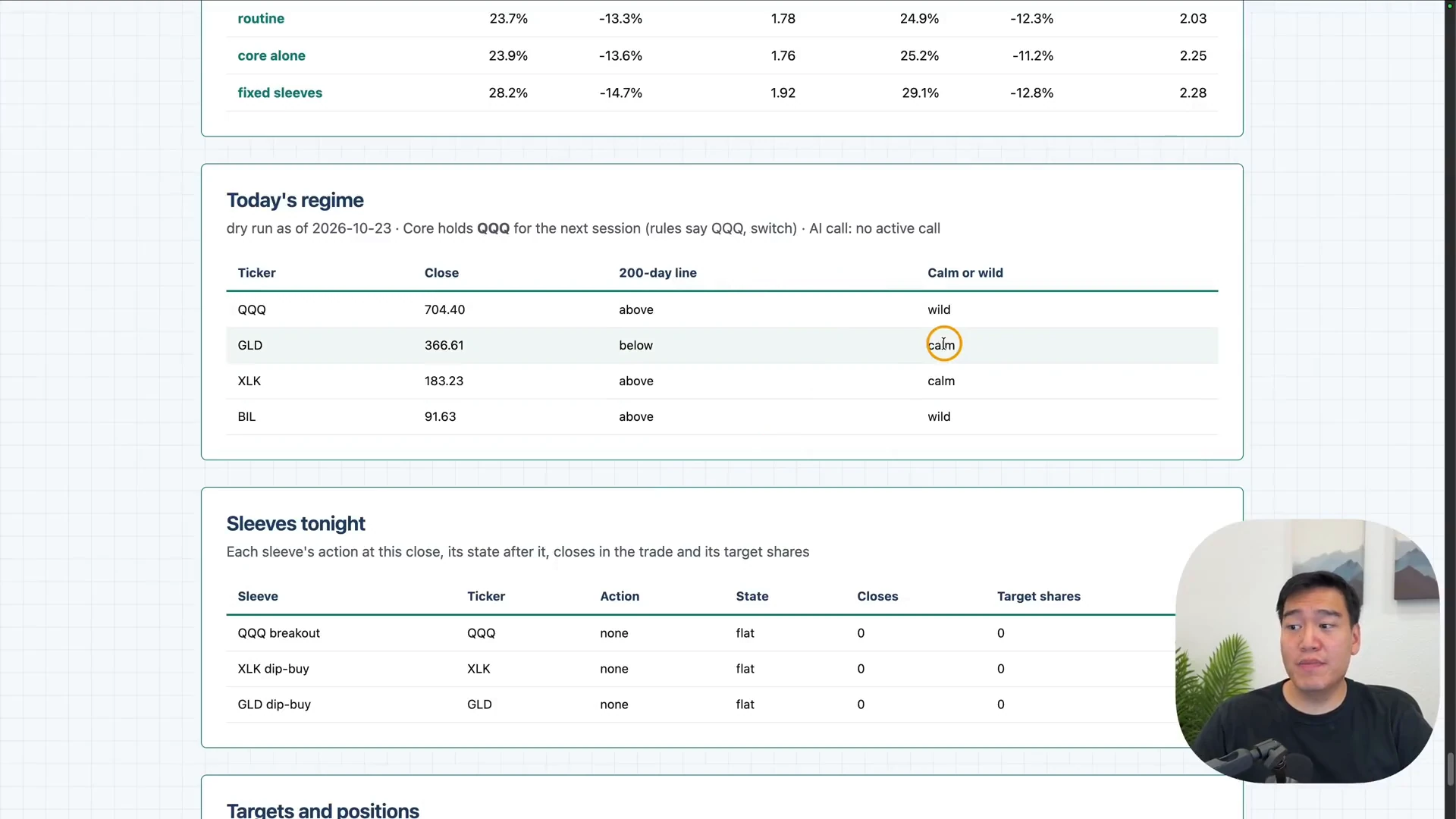
The daily output is a regime dashboard (125:11): today's market state, which sleeves are active, what the bot plans to do and why. Read it every morning for a month and compare its decisions to what you'd have done manually. If it trades 11 times on a day you'd have sat on your hands, you have a disagreement to resolve before real money shows up.
He also includes an optional AI layer that reads news, emails, newsletters or a Substack you subscribe to, and when that layer is switched off, the bot simply logs that it saw the call without acting (122:50). That on/off design is good engineering. You can measure whether the AI layer helps or just adds noise.
If you want a wider view of how automated systems behave before you commit, our breakdown of whether AI trading bots actually make money runs the numbers on the category. And what to know before you automate trades covers the failure modes worth knowing in advance.
Data: free Yahoo Finance data vs paid intraday providers
Free daily data is fine for swing strategies. It's not fine for anything intraday.
He points to dedicated intraday providers in the $29 to $199+ per month range, with options data at the pricier end, offering 5 to 20 years of history (47:34). Names mentioned include Databento.
| Data source | Cost | Good for | Weak spot |
|---|---|---|---|
| Yahoo Finance (free) | $0 | Daily bars, swing and core strategies | Survivorship bias, gaps, no reliable intraday |
| Broker API data (Alpaca/IBKR) | Included | Live quotes, recent bars | Short history for backtests |
| Paid intraday provider | ~$29,$199+/mo | Minute bars, 5-20 yrs history | Overkill if you trade daily bars |
Decision rule: if your strategy holds positions for days, pay nothing. If it holds for minutes, pay. Backtesting a scalping strategy on free daily data is how people convince themselves they found something.
One more cost nobody budgets: the Claude API itself. Anthropic lists Opus 5 at $5 per million input tokens and $25 per million output tokens, with a 50% batch discount, and web search at $10 per 1,000 searches. A research loop that re-scans a hundred tickers every morning adds up. Batch it.
⭐ Top 5 Features We Love
Five things this build does genuinely well, each tied to a moment you can go verify yourself.
1. The plan-first prompting method (13:52). Writing a numbered build spec before letting Claude touch a file is the difference between a system you can audit and a blob you can only pray over. This alone is worth the watch for anyone using Claude Code on anything, trading or not.
2. Testing the backtest engine with a planted edge (76:34). He injects a known ~1% signal into data and checks whether the engine reports roughly 1% minus costs. Validating your measuring instrument before trusting its measurements is standard practice in science and almost unheard of in retail trading content.
3. Neighbor checks against overfitting (90:39). Testing parameters on either side of the winner kills the single most common beginner failure: finding a number that worked once and calling it an edge. Combined with locked test windows, it's real methodology.
4. Kill switches that get tested on camera (131:07, 151:13). He forces the pause and kill conditions to fire and shows drawdown against the kill lines. Anyone can write if drawdown > 0.05: stop. Proving it executes is the part that matters.
5. Showing the cost drag slide (175:21). Putting 0.1% per trade against 5, 50 and 250 trades a year in front of beginners, on camera, is the opposite of guru behavior. High-frequency strategies have to clear a cost hurdle most people never calculate.
Honorable mention: the AI news layer has an off switch that still logs what it saw (122:50). That's how you measure whether a feature is helping instead of assuming it is.
⚠️ Things to Look Out For
The honest risks, in order of how likely they are to cost you money.
No verified live results. Backtests, a paper account, and a dashboard. Nowhere does the video establish that this system makes money in a live account over a meaningful stretch. He discloses it's educational content, which is the correct disclosure. It's also the ballgame.
Claude writes working code, not a working edge. Engineering analysis published November 6, 2026 makes this point bluntly: Claude can produce functioning bot code, but nothing demonstrates the generated strategy is profitable. The rules, the testing, the review and every order remain your responsibility. A clean codebase with no edge loses money efficiently.
The broader evidence on AI alpha is unflattering. The FINSABER benchmark reportedly found that language-model timing advantages deteriorated across two decades and more than 100 symbols. DeepFund reportedly found historical backtests can leak future information through a model's own training data, and that strong models still produced net live losses. A September 2026 Backtrader-Bench preprint showed tool-augmented models hitting 90% accuracy versus 73% without tools, but that's a 30-question coding benchmark. Solving algorithmic-trading questions is not the same skill as making money.
API key handling is a real attack surface. Never paste live broker credentials into code you didn't write and don't understand. Use testnet or paper credentials, run in a container or sandbox, use manual permission mode in Claude Code, review every diff, and deploy from a host separate from your dev machine. That's the current recommended posture, and it exists because prompt injection in agentic coding tools is not hypothetical.
Running costs stack up. Market data, possible intraday subscriptions, Claude API tokens, broker fees, and your time maintaining it. Models get retired (Sonnet 4.5 on November 30, 2026), APIs change, and a bot nobody maintains breaks quietly on a Tuesday.
Taxes and record-keeping. An automated bot can generate a lot of short-term trades. Short-term gains are taxed as ordinary income in the US, and wash-sale rules apply to a bot that keeps re-entering the same ticker. Your broker's 1099-B is the starting point, not the finish line.
Who this isn't for: anyone who wants a bot running by Friday, anyone who won't paper trade, anyone who can't read the code well enough to spot when Claude invents a function. Also anyone with under roughly $2,000, where position sizing and cost drag crush any realistic strategy. If that's you, our guide to day trading without $25K is a better starting point.
What Should a Claude Trading Bot Pass Before It Goes Live?
A pre-flight checklist. Pilots use them because smart people forget simple things under pressure, and a Claude trading bot is just code that never gets tired of being wrong.
Before you flip from paper to live, every box below should be a yes:
- Keys live in an environment file, not in the code and never pasted into a chat.
- A daily loss limit halts trading on its own. You shouldn't need to be awake for the bot to stop.
- The backtest included costs and slippage, and the result still cleared the keep-or-kill bar from the course.
- Thirty or more paper sessions are logged, and the paper results look roughly like the backtest.
- Every order writes a log line with time, symbol, size and the reason it fired.
- You can kill it in one step from your phone.
Claude can write all of that for you. It can't decide that your Claude trading bot is ready. That call stays with you, and the checklist is how you make it with a straight face.
Flex or Cap? Our Verdict
Verdict: Flex on the build, Need More Receipts on the money.
Scored on four questions:
| Question | Grade | Why |
|---|---|---|
| Receipts shown | Strong | Backtests, sleeve comparisons, drawdown vs kill lines, live pause tests, cost drag slide, all on screen with timestamps |
| What can be verified | Partial | Method is reproducible. Profitability is not. No audited live statements |
| Risk disclosed | Strong | Explicit "not financial advice," slippage math, cost drag, small-account limits, kill switches tested |
| Can a regular retail trader repeat it | Mostly | Yes with 3 hours, patience, and about $30 to $50 a month. No if you expect it done by Sunday |
Three out of four is a better scorecard than almost anything in this corner of YouTube. He teaches process, not predictions, and he shows the unglamorous parts: slippage, fees, overfitting, the 5% day that shuts the whole thing down.
The cap is in the implied promise. "Fully automated trading bot placing real orders" sounds like an income system. It's an execution system. Execution without edge just converts your money into fees faster and with better logging. The build is real. The money isn't demonstrated.
Not a cap. Not a complete flex either. A genuinely useful build tutorial that stops exactly where the hard part begins. Process over prediction, and this one delivers the process.
What You Should Know Before You Try It
Six things to lock in before you start the build.
1. Paper trade for 30 days minimum, no exceptions. Alpaca's paper environment is free. Run the whole thing, read the regime dashboard every morning, and log the disagreements between what the bot did and what you'd have done. If you can't sit through 30 days of fake money, you won't sit through a real drawdown.
2. Size positions before you size ambitions. Decide max risk per trade (1% of account is a common starting point), max open positions, and max daily loss. Put those numbers in the risk check that runs before every order (122:50), not in a notebook. A limit the code doesn't enforce isn't a limit.
3. Model your cost drag honestly. Use the calculator above. At 0.1% per trade, 250 trades a year is a 25% hurdle before you make a dollar. If your strategy trades a lot, it needs a bigger edge, not a better narrative. Fewer, cleaner setups usually beat more.
4. Keep live credentials out of the dev environment. Paper keys only while building. Keys in a .env file, never in the code, never in a repo. Sandbox Claude Code. Review every diff before you run it. Deploy live from a separate machine.
5. Plan for taxes and keep a journal. Short-term trades are ordinary income in the US. Wash-sale rules will catch a bot that re-enters the same name repeatedly. Keep a separate log of why each strategy was running, which our trading journal template covers. For the rules themselves, the SEC's Investor.gov is the right place to verify, not a Discord.
6. Know the alternative exists. If three hours of Claude Code sounds like a weekend you'd rather spend elsewhere, no-code platforms already do a version of this. Our Composer Trade review looks at one, and the full field of AI trading bots is scored on the directory. Building it yourself buys you transparency and control. Buying it saves you a weekend. Both are defensible.
Keep reading on FullStack Alpha: our Alpaca review, AI trading bot breakdowns on AI Stock Trading Bots, the AI trading bot shortlist, and more Flex or Cap breakdowns.
Frequently Asked Questions
Can Claude create a bot?
Yes. Claude Code can generate a complete trading bot: data loading, strategy rules, a backtest engine, risk checks, and a broker connection to Alpaca or IBKR. It writes real files in a real folder and fixes its own errors. What it can't do is guarantee the strategy inside that bot has an edge. Working code and a working edge are separate problems, and only one of them is solved by better prompting.
What are the best AI trading bots?
Depends on whether you want to build or buy. Build-your-own with Claude Code gives maximum transparency and no subscription, at the cost of three-plus hours and ongoing maintenance. No-code platforms like Composer let you assemble and backtest strategies without writing anything. Broker-native tools work if you only trade one account. FullStack Alpha scores tools on five pillars (signal quality, transparency, price-to-value, usability, community verdict), and the honest answer is that "best" changes with your account size and how much code you're willing to read.
Are AI trading bots any good?
They're good at execution and discipline, and unproven at generating alpha. A bot won't revenge trade, won't skip the stop loss, and won't check its phone 14 times a day. That behavioral benefit is real. On returns, recent benchmark work is skeptical: the FINSABER study reportedly found language-model timing edges decayed over two decades, and DeepFund reportedly found backtests leaking future information through training data while live results went negative. Automate your rules, don't automate your hope.
Who makes Claude bots?
Anthropic makes Claude and Claude Code, the tools. The bot is made by you. Creators like AI Pathways sell the prompts and source code that structure the build, and third-party platforms wrap Claude's API into packaged products. Nobody at Anthropic builds, endorses, or supports your specific trading bot. Their November 12, 2026 usage policy update is worth reading before you deploy anything that moves money.
Can Claude bot make money?
A Claude trading bot can place profitable trades if the underlying strategy has a genuine edge and the costs stay below it. Claude supplies the execution, not the edge. The honest sequence is backtest with real costs, validate on a locked window, paper trade 30 days, then risk money you can afford to lose. No course, no prompt and no model can promise returns, and anyone who does is selling something other than a bot.
How much does it cost to run a Claude trading bot?
Budget roughly $20 to $100 a month for a daily-bar swing system: Claude API tokens (Opus 5 runs $5 per million input and $25 per million output tokens, half that with batching), free or cheap data, and a zero-commission broker. Intraday data providers run $29 to $199+ a month, and options data costs more. The bigger cost is usually trading friction, not software.
One tool examined, one build walked through. There are 200+ more AI trading tools catalogued in the FullStack Alpha directory, filterable by category, price and what they actually do.
Browse the directory → aistockpickerapps.com
Build the bot. Test the kill switch. Then Your market edge starts with the right tool. Stay alpha.
Can a Claude trading bot trade options or crypto?
Technically yes, because Alpaca's API covers stocks, options and crypto, and Claude can write code for any of them. Practically, start a Claude trading bot on liquid stocks or ETFs first. Options add expiration and pricing risk that a beginner bot can mishandle fast.