 Claude Code
 ChatGPT
 Alpaca
 Python
 Yahoo Finance

Quick Answer
Learning how to build an AI trading bot with Claude is genuinely beginner-friendly now, and Ray Fu's September 2026 tutorial proves it: install Claude Code, open a free Alpaca paper trading account, connect the two with an MCP server, and let Claude write a moving average crossover bot that runs itself every morning. That part works. What it doesn't do is make money, and Fu says so on camera at the two-minute mark. You're building a research machine, not a cash register.
The build is a flex. Treating the output as a strategy is cap.
Key Takeaways
- The build takes under an hour and requires zero coding from you. Claude Code writes the Python, the environment file, and the scheduler.
- Alpaca paper trading is free and gives you fake money in a real market feed. Fu funds his demo account with $50,000 of pretend capital.
- The MCP server is the bridge. MCP (Model Context Protocol) lets Claude read your account balance and place orders without you pasting keys into a chat window every time.
- The strategy taught is a 20-day/50-day moving average crossover, the trading equivalent of learning to drive in an empty parking lot. Simple, honest, and it loses money in choppy, sideways markets.
- No profit claims are made in the video. Fu is a former Meta software engineer teaching AI workflows, not a trading guru selling a system.
- Overfitting is the real danger. If you let Claude rewrite a strategy 40 times until the backtest looks good, you've built a curve-fit to noise.
- Write your success and failure numbers down before you backtest. Expected return, win rate, kill threshold. Otherwise you'll move the goalposts.
- Your Mac has to stay awake for a launchd-scheduled bot to fire. That's a real limitation nobody mentions until day three.
What Does Ray Fu Actually Claim?
Fu claims one thing: that a complete beginner can learn how to build an AI trading bot with Claude, a working automated paper-trading bot on Alpaca, in a single sitting, without writing code. He demonstrates it end to end. He makes no profit claim whatsoever, which is rarer than it should be in this corner of YouTube.
The receipts on screen are build receipts, not performance receipts. Here's what the original video actually shows:
| Timestamp | What's on screen | What it proves |
|---|---|---|
| 2:01 | Verbal disclaimer, paper trading only | Risk is disclosed up front, not buried |
| 4:02 | Alpaca paper account funded at $50,000 | Fake capital in a real market |
| 5:35 | Claude config file with Alpaca MCP keys | The connection is real, not a mockup |
| 6:35 | Claude correctly reports $50,000 and zero positions | The bridge works both ways |
| 9:07 | Admission the strategy fails in choppy tape | Honest about the strategy's weakness |
| 13:06 | Bot scheduled to run at market open daily | Automation actually completes |
His disclaimer is blunt and worth repeating: "I'm not a financial advisor and this is not financial advice" (2:01). He also tells you the uncomfortable part about the strategy himself: "no strategy wins every time, and this one's no exception" (9:07).
That's the tell of someone teaching a skill rather than selling a dream. The video has pulled over 650,000 views, which says more about demand for AI build tutorials than about demand for crossover strategies.
Market truth: the hard part of trading was never writing the code. It was knowing what to code. Claude solves the easy half and hands you the hard half with a bow on it.
How to Build an AI Trading Bot With Claude, Step by Step
Seven steps, roughly 45 to 60 minutes if nothing breaks. You need a Mac or PC, a Claude subscription with Claude Code access, and an email address for Alpaca. No money leaves your account at any point in this build.
Here's the full sequence before the detail:
- Install the Claude desktop app and open Claude Code
- Open a free Alpaca paper trading account
- Connect Alpaca's MCP server to Claude via the config file
- Ask Claude about your account and place a single test order
- Pick a strategy (the 20/50 moving average crossover)
- Have Claude write the bot plus an environment file for your keys
- Schedule it to run automatically every market morning
Step 1: Install the Claude desktop app and open Claude Code
Download Claude from Anthropic's site and install the desktop app. Inside the app, find the Code section. Claude Code is the piece that matters, it's the version of Claude that can read and write files on your actual computer, run terminal commands, and install packages. Regular chat Claude can write you code; Claude Code can build the project.
Create a dedicated project folder before you type a single prompt. Fu keeps a parent "projects" folder and makes a new subfolder per build, named something obvious like claude-paper-trading (3:02). Click the folder icon next to the chat and point Claude at it.
Why this matters: Claude Code writes files wherever you tell it to. Skip the folder step and you'll have a Python script, a config file, and a stray .env scattered across your Downloads like a crime scene.
Common mistake: running Claude Code in a folder you share with cloud sync. Your API keys end up backed up somewhere you didn't intend. Use a local folder.
Step 2: Open an Alpaca paper trading account
Alpaca is a US broker built API-first, which is why every bot tutorial on the internet uses it. Signup is free and the paper account needs no deposit, no SSN verification for paper-only use, and no waiting period.
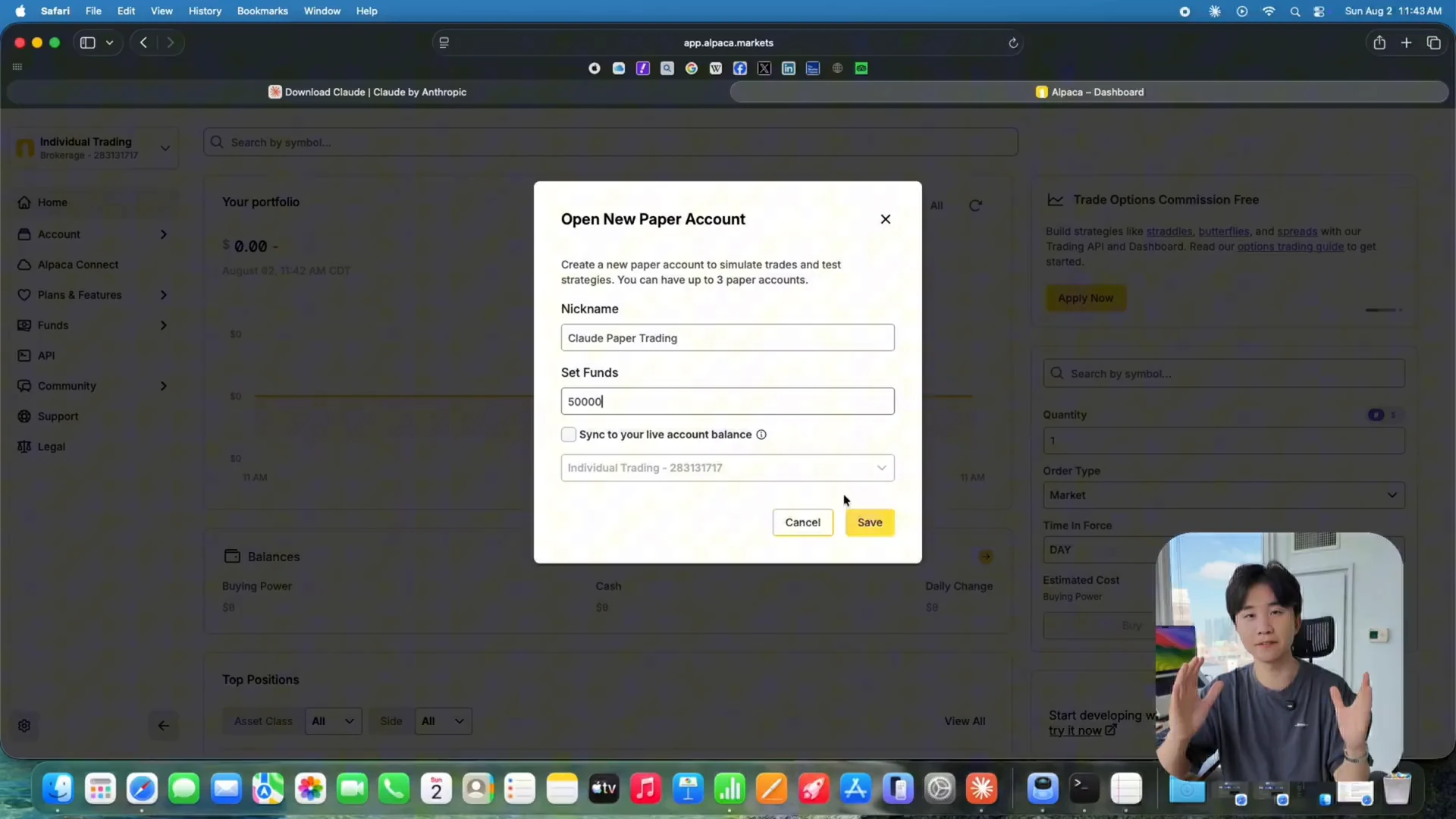
Inside the dashboard, create a new paper account and set a starting balance. Fu picks $50,000 and makes the obvious joke that you could set it to $200 million if you wanted (4:02). Don't. Set your paper balance to the amount you'd actually trade with, because position sizing is the single habit this whole exercise should be teaching you. Trading a pretend $500,000 account teaches you nothing transferable.
A screenshot of Alpaca's new paper account screen at 4:12 shows exactly where this lives in the dashboard.
Decision rule: if your real account is under $5,000, set paper at $5,000. The point is reps at your real size, not fantasy football.
Step 3: Connect Alpaca's MCP server to Claude (the config file)
MCP stands for Model Context Protocol. In plain English, it's a standard plug that lets an AI assistant talk to an outside service with permission. The MCP server is what turns Claude from a thing that writes code into a thing that can check your buying power.
The connection lives in a config file. You paste a block of JSON that tells Claude where the Alpaca MCP server is and hands it your paper API keys. Fu's warning at 5:35 is the one that trips people: paste the code block in at the top, and leave a comment after the final closing bracket or you'll throw a syntax error. JSON is unforgiving about stray commas.
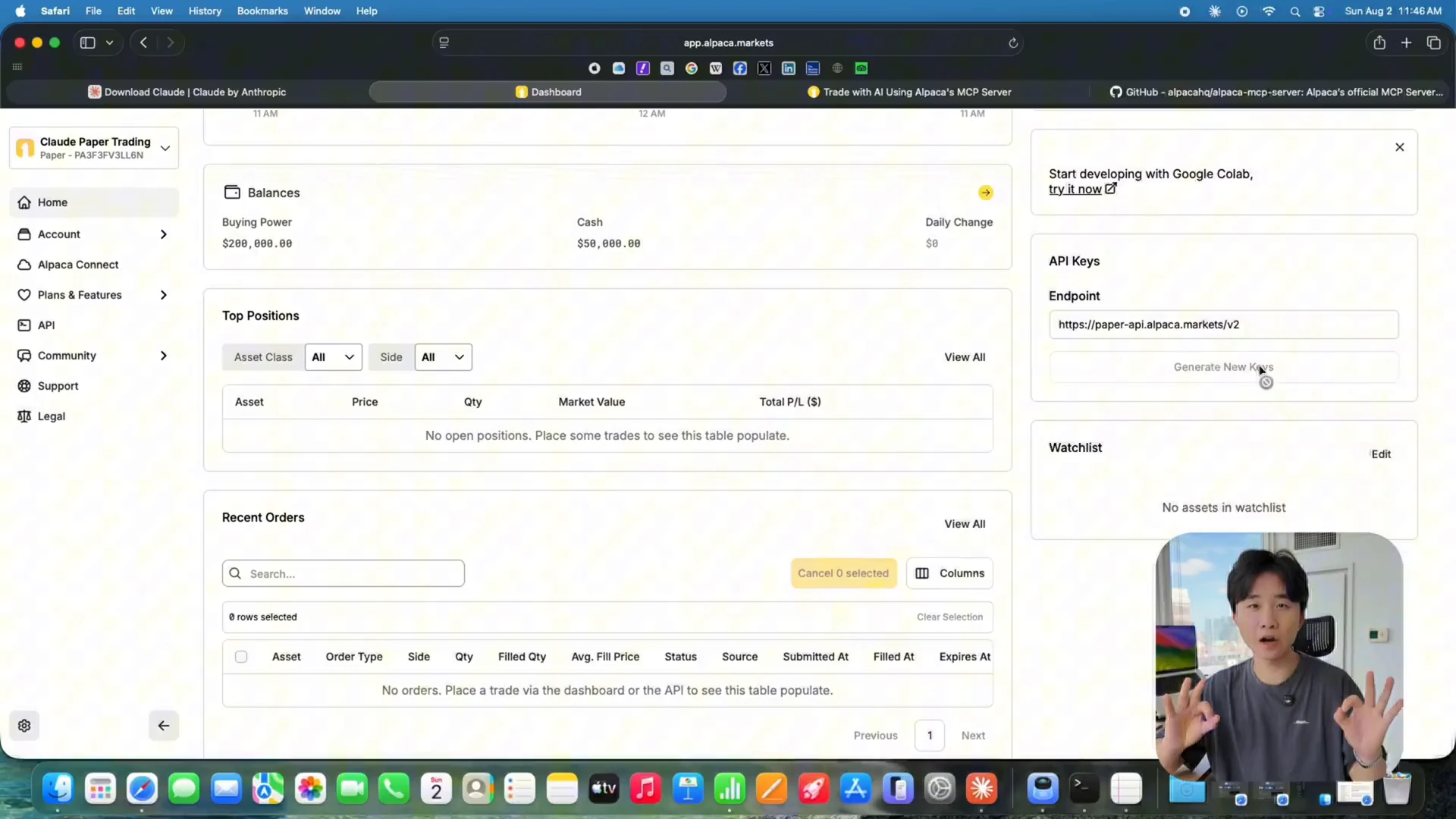
You generate two keys from the Alpaca dashboard: an API key and a secret key. The secret key is shown once. Copy it immediately. If you close that panel, regenerate the pair and start over. Fu hits exactly this problem on camera. A screenshot at 5:48 shows the Alpaca paper API panel with the keys hidden, which is how your screen should look if you ever record this yourself.
Make sure the endpoint URL contains paper-api, not api. That one word is the difference between fake money and your money.
Step 4: Ask Claude about the account and place a test order
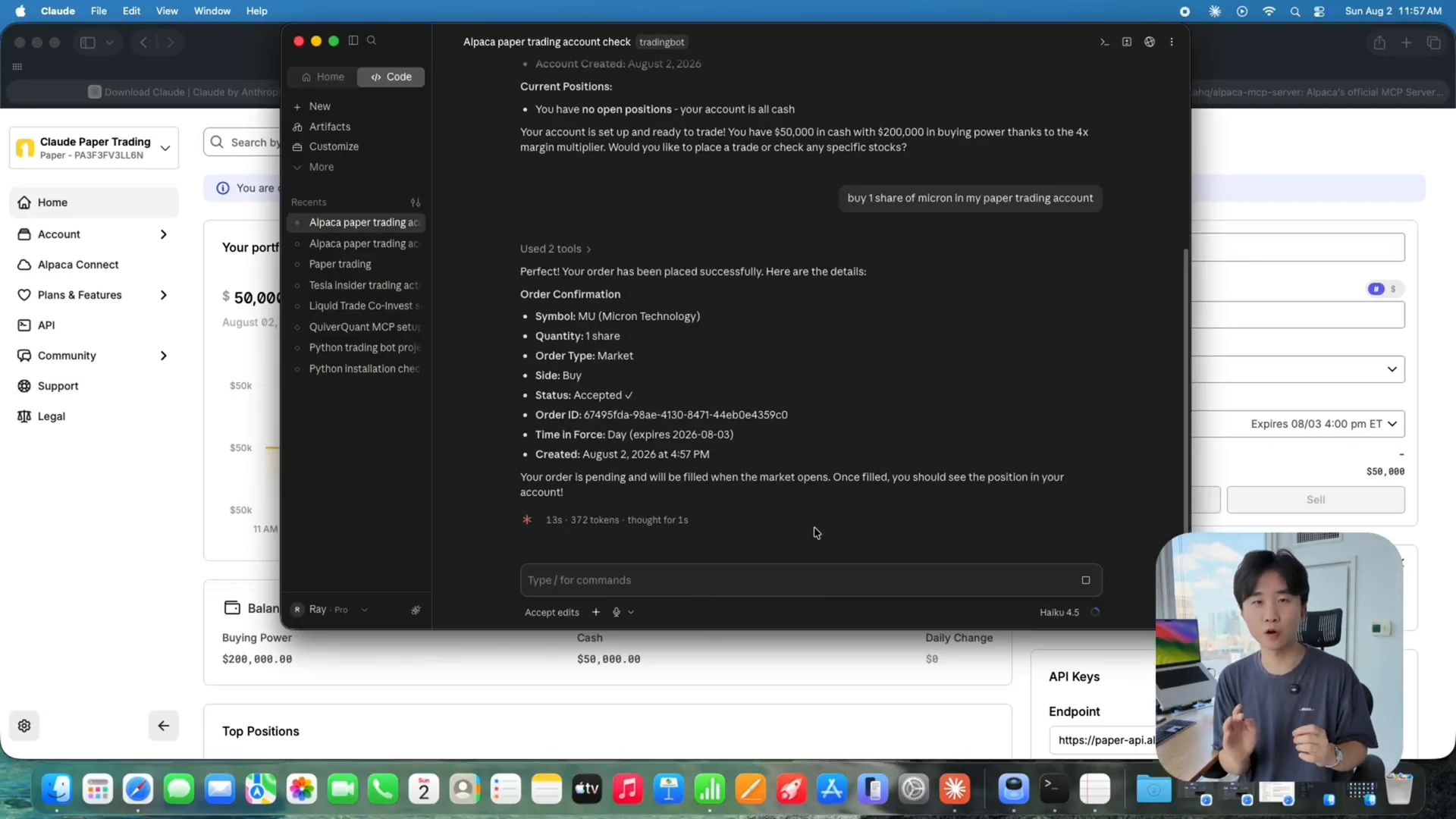
Before building anything, test the pipe. Open Claude Code and ask a plain question: how much money is in my account, and do I hold any positions? (6:35)
Claude should come back with your exact paper balance and an empty position list. If it reports something else, your keys are wrong or you're pointed at the live endpoint. Fix that before you go further.
Then place one deliberately tiny test order. Fu buys a single share of Micron through the Alpaca MCP, visible on screen at 7:09. One share. Not ten, not "a position." One share is your canary. It confirms order routing works, confirms the account accepts the order type, and costs you nothing because it's paper.
Fu also notes something practical here: he's deliberately running an older, cheaper Claude model for these simple account queries to conserve token usage (6:35). Checking a balance doesn't need the flagship model. That habit will save you real dollars across a few hundred prompts.
Edge case: place a test order outside market hours and it'll queue rather than fill. That's correct behavior, not a bug. Check the order status before assuming your connection broke.
Step 5: Choose a strategy: the 20-day and 50-day moving average crossover
A moving average is just the average closing price over the last X days, recalculated daily. It smooths out the noise so you can see the direction underneath the daily chop. The 20-day average reacts quickly. The 50-day average reacts slowly.
The crossover rule:
- 20-day crosses above the 50-day = buy signal (short-term momentum is beating the longer trend)
- 20-day crosses below the 50-day = sell signal (momentum is rolling over)
That's the whole thing. Fu calls it "the simplest one that actually works" (7:35) and it's a defensible teaching choice. You can read the logic out loud and understand it, which means you can tell when the bot misbehaves.
The crossover must happen between two consecutive days for the bot to act (10:06). This prevents the script from re-buying every morning just because the averages happen to be in the right order.
Fu's demo uses Apple as the symbol (12:07), though any liquid, trending name works. Stay away from low float stocks, thinly traded names where small orders swing the price, for a first bot. The fills will lie to you.
In his follow-up October 2026 guide, Fu expands this architecture to five instruments: SPY and QQQ on 15-minute candles for mean reversion, BTC/USD on hourly candles for breakouts, and GLD and USO on 4-hour candles using a 50/200 EMA crossover. That's where you go after the single-symbol version is boring you. Not before.
Step 6: Have Claude write the bot and an environment file for the API keys
Now you prompt. Describe what you want in plain English and be specific about the mechanics:
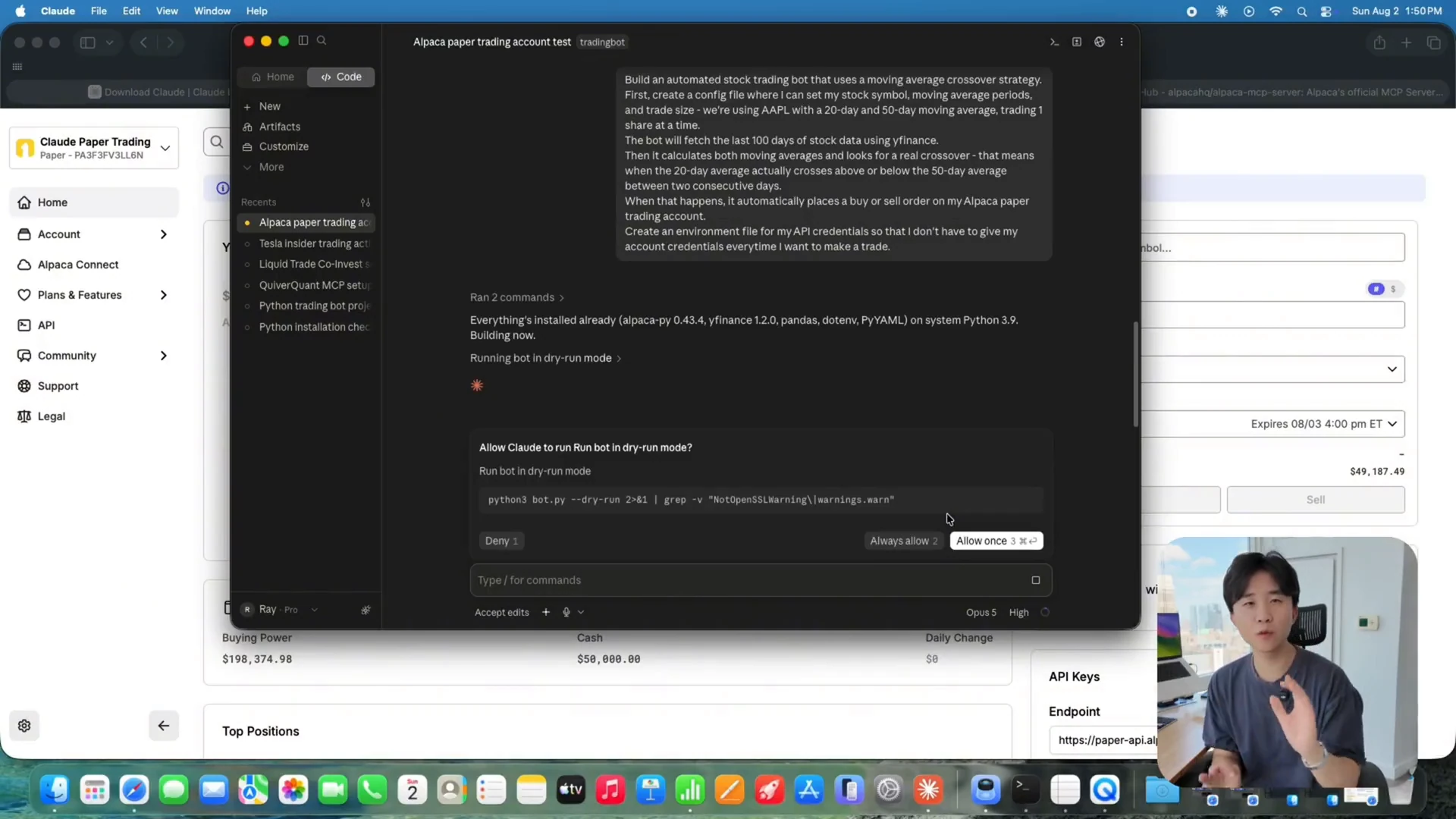
Build a Python script that checks AAPL's 20-day and 50-day simple moving averages each weekday at market open. If the 20-day crosses above the 50-day between two consecutive days, buy 1 share through my Alpaca paper account. If it crosses below, sell. Store my API keys in a.env file so they're never hardcoded.
Claude Code writes the script, installs the libraries, and creates the .env file. You paste your Alpaca paper key and secret into that file where it tells you to (11:06). A screenshot at 10:38 captures Claude mid-build on the moving-average logic.
Why the environment file matters more than it sounds. Hardcoded keys inside a script get committed to GitHub, pasted into Discord when you ask for help, and screenshotted in a tweet. A .env file keeps credentials in one place you can rotate or delete. Add .env to your .gitignore immediately.
Before you accept the code, ask Claude to explain each block in plain English. If you can't follow the explanation, you can't debug it at 9:31 on a Tuesday when it buys three shares instead of one.
Step 7: Schedule the bot to run on its own (launchd on a Mac)
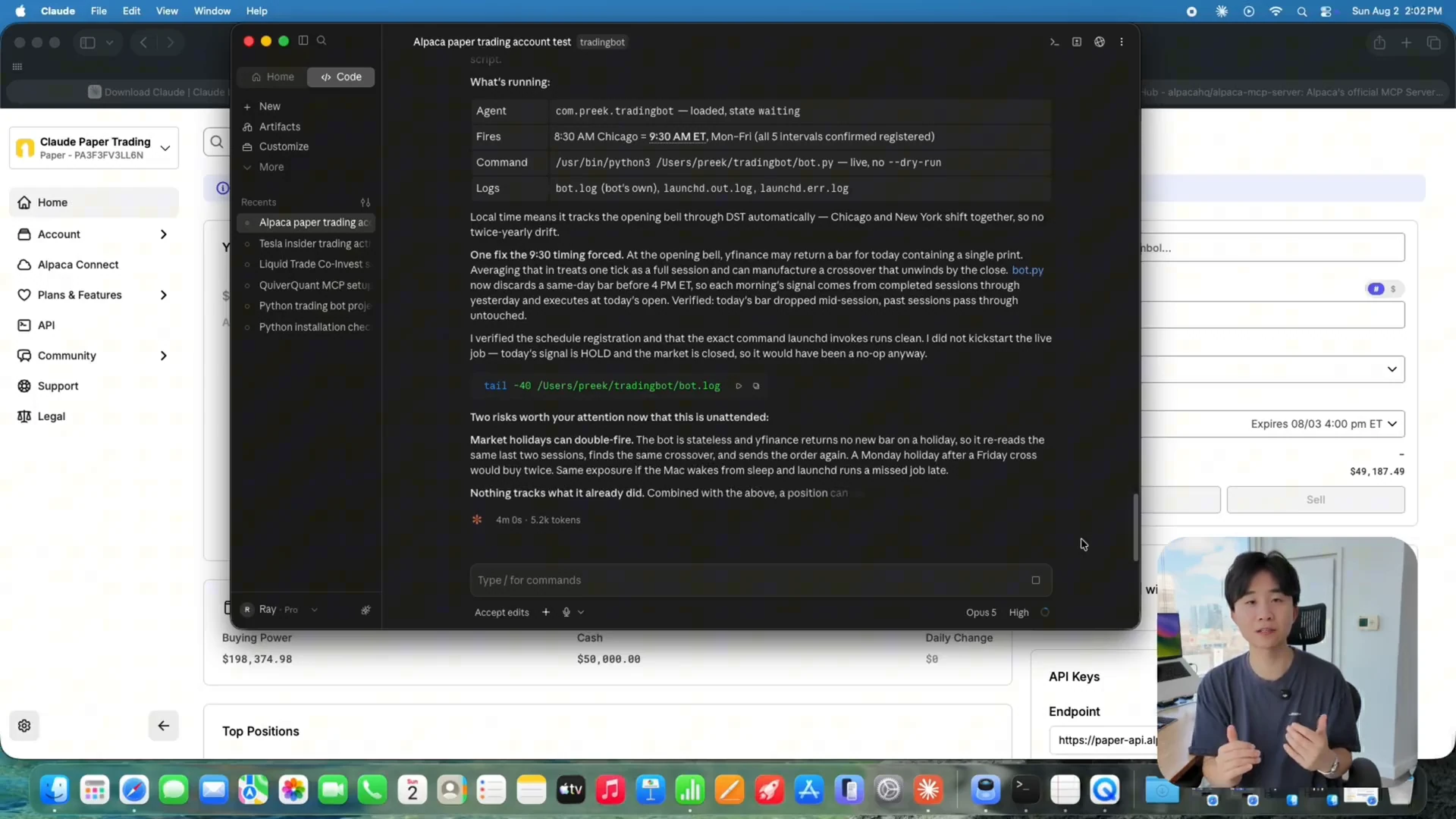
Automation is the last step. On macOS, launchd is the built-in job scheduler that fires tasks at set times. Ask Claude to write and load the launchd plist file, and the bot will wake at 9:30 Eastern every weekday, run the check, and place or skip a trade (13:06). A screenshot at 13:04 shows the confirmation that scheduling completed.
On Windows, the equivalent is Task Scheduler. Same concept, different plumbing.
The limitation nobody warns you about: your computer must be awake and online for the job to fire. Close the lid Sunday night and your Monday signal never runs. Options, in order of cost:
- Change your Mac's energy settings to wake for scheduled tasks
- Move the script to a cheap cloud VM (around $5 to $10 a month)
- Accept that you'll miss some days and treat it as a study tool, not a live system
Choose the third option if you're still learning. A bot that misses a signal in paper trading costs you nothing. A bot that misses a signal in a live account costs you your stop loss discipline, because you'll start trading around it manually. That's how a system turns into revenge trading.
Why crossovers struggle in choppy, sideways markets
Crossovers make money when a stock trends and bleed money when it doesn't. Fu names this directly: in a choppy, sideways market the two lines cross back and forth and you "rack up a bunch of small losing trades" (9:07).
The mechanics are simple. A moving average is a lagging indicator, it describes what already happened. In a strong uptrend, lag is fine, because the trend persists long enough for the signal to pay. In a range-bound tape, every little wiggle triggers a crossover, you buy near the top of the range, and you get stopped out near the bottom. Repeat eight times and commissions and slippage finish the job.
The trend is your friend is not a bumper sticker. It's a precondition for this entire strategy.
Practical filter: add a regime check before the crossover logic. Only take buy signals when price is above the 200-day moving average. It won't make the strategy great, but it stops the bot from buying every dead cat bounce in a downtrend. Ask Claude to add it, it's a four-line change.
⭐ Top 5 Features We Love
Five things this method genuinely gets right, each anchored to something on screen or to verifiable 2026 developments.
1. The disclaimer arrives at 2:01, not minute 14.
Fu puts paper-trading-only on the table before the first keystroke. Compare that to the average "AI trading bot" video where the risk language shows up as grey six-point text under the thumbnail. Front-loaded honesty is a feature.
2. The MCP connection is a real architecture, not a gimmick.
Model Context Protocol is becoming the standard way assistants touch brokerage accounts. On November 4, 2026, PrimeXBT launched an MCP integration letting Claude and ChatGPT connect to trading accounts with read-only and read-and-trade permission modes, with withdrawals excluded entirely. Learning MCP in a paper sandbox now means you understand the plumbing the whole industry is standardizing on.
3. The one-share test order is correct engineering discipline.
Buying a single share of Micron at 7:09 is the smallest possible experiment that proves the full path works. That's how professional systems get deployed. Most beginners skip straight to the strategy and never learn whether their order routing works at all.
4. The environment file habit is taught early.
Separating credentials from code at step six is a security practice most self-taught traders learn the hard way. Fu builds it into the prompt. Small thing, big consequence.
5. The strategy's weakness is named out loud.
A tutorial that tells you the crossover gets chopped up in sideways tape is a tutorial that respects you. Fu's own November 2026 research-loop guide goes further, calling the project not a money machine and warning that most strategies, including AI-generated ones, lose money. That's a creator optimizing for your outcome instead of his conversion rate. If you want to see how the same honesty standard applies to paid products, our breakdown of whether AI trading bots actually make money ran the numbers.
⚠️ Things to Look Out For
Now the parts that cost people money, time, or both.
No live performance record exists. Nothing in the video establishes that this bot makes money. The demo is a paper account with fake capital over a short window. Treating a build tutorial as a strategy endorsement is the error, and it's yours to avoid, not Fu's.
Overfitting is the technical trap. Fu flags this in his own research-loop guide, and he's right. If you tell Claude "the backtest lost money, try again," and it rewrites the strategy twenty times until the equity curve looks pretty, you haven't found an edge. You've found a shape that fits past noise. His fix is simple and should be non-negotiable: write down your expected return, win rate, and failure threshold before you run the backtest. If you can change the scoreboard after the game, you always win on paper and always lose with money.
The always-on computer problem. launchd only fires when the machine is awake. Expect to miss signals unless you solve hosting.
Real costs are small but not zero. Claude's paid tiers run roughly $20 to $100+ per month depending on plan and usage, and Claude Code chews tokens when it debugs. Alpaca paper is free. A cloud VM is $5 to $10 a month. Budget $25 to $120 monthly to run this seriously.
Slippage and fills don't exist in paper. Paper trading assumes you get the price you asked for. Real markets don't. A strategy that's marginally profitable on paper is often negative live once spreads and slippage show up. Discount your paper results before you believe them.
Who this is not for. If you've never placed a manual trade, build the bot as a coding exercise and keep it in paper indefinitely. If you want a hands-off money machine, you'll be disappointed and probably poorer. And if you're hoping to run this on low float momentum names, the crossover logic will get destroyed by the volatility. For a sense of what properly built platforms do differently, our head-to-head of the best AI trading tools in 2026 covers the field.
Regulatory reality. Automated trading in your own retail account is legal in the US. But you still owe taxes on short-term gains at ordinary income rates, and wash sale rules apply to a bot that buys back a loser inside 30 days. A bot that trades the same ticker repeatedly will generate a tax document that looks like a phone book.
How Long Does It Take to Learn How to Build an AI Trading Bot With Claude?
An afternoon for the build. Months for the trust. Here's a realistic time budget if you follow Fu's steps as a true beginner:
| Step | Realistic time |
|---|---|
| Install Claude desktop and open Claude Code | 15 to 30 minutes |
| Open an Alpaca paper account and get API keys | 20 minutes |
| Connect the MCP server and test an order | 30 to 60 minutes |
| Have Claude write the crossover bot and .env file | 30 minutes |
| Schedule it to run each morning | 20 minutes |
| Paper trade long enough to judge it | 60 to 90 trading days |
That last row is the one tutorials skip. Learning how to build an AI trading bot with Claude is a weekend project. Learning whether it deserves money takes a full season of paper results, including at least one choppy stretch where moving average crossovers usually struggle.
So when someone asks how to build an AI trading bot with Claude fast, the honest answer is: build it fast, judge it slow.
Flex or Cap? Our Verdict
Scored on four questions, because that's how you judge any claim on the internet.
| Question | Grade | Why |
|---|---|---|
| Were receipts shown? | Strong | Account balance, test order, config file, scheduled job, all on screen |
| What can be verified? | Strong, but narrow | The build works. Performance is unverified because none was claimed |
| Was risk disclosed? | Strong | Paper-only at 2:01, strategy weakness at 9:07, no return promises anywhere |
| Can a regular retail trader repeat it? | Yes, with effort | A Mac, a Claude plan, free Alpaca, under an hour if the JSON cooperates |
Verdict: Flex.
Understand precisely what's being flexed. Learning how to build an AI trading bot with Claude is now a genuinely accessible weekend project, and Fu demonstrates it cleanly without a single profit claim. That's the win.
The cap would be yours, not his: assuming the finished bot has an edge. A 20/50 crossover on Apple is one of the most widely known rules in existence. Thousands of people run it. Edges don't survive that kind of crowding.
What you've actually built is a testing rig. Something that executes a rule without hesitating, without revenge trading, and without talking itself out of a stop loss at 3:50pm. That's worth more than most traders realize, because the machine does the one thing humans reliably fail at: it follows the plan. Discipline beats prediction, and a script has infinite discipline and zero opinions.
Use it to test ideas fast. Don't use it to replace thinking. If you want a managed version of this concept, our Composer Trade review looks at whether an AI-built algo is one you'd actually run.
What You Should Know Before You Try It
Six practical points, in the order they'll matter.
1. Paper trade it for a minimum of 30 signals. Not 30 days, 30 actual crossovers. A crossover bot on one stock might generate four signals a year. Run it across five to ten tickers to gather data in reasonable time, or accept that the evaluation takes quarters, not weeks. Log every trade. A trading journal template beats memory every single time.
2. Position size before you pick a strategy. The bot buys one share by default, which is fine. The moment you scale it, define a maximum risk per trade as a percentage of account value, 1% is the usual starting point. That means if the trade goes against you to your stop, you lose 1% of the account, not 1% of your nerve.
3. Know the real monthly cost. Claude subscription plus optional VM hosting lands most people between $25 and $120 a month. If you're trading a $2,000 account, that's a meaningful performance drag before you've placed a single trade. Do that math honestly.
4. Taxes and wash sales apply. Every closed paper trade teaches you nothing about taxes. Every closed live trade does. Short-term gains are taxed as ordinary income. Repeated buy-sell-rebuy on the same ticker triggers wash sale complications. Talk to a CPA before you scale.
5. Verify broker status, not marketing copy. Check any broker's registration on FINRA BrokerCheck and read the SEC's investor education material on automated trading before you connect real money. Free, five minutes, saves careers.
6. Know when to stop. Define your kill condition in writing: "If the bot is down more than X% after 30 signals, I turn it off." Set it now, while you're calm. Not during a drawdown, when you'll find eleven reasons to give it one more week. Play stupid games, win stupid prizes.
If you'd rather test an edge without building anything, start with how to find a trading edge before you risk a dollar.
Where This Goes Next
The single-bot build is step one of something bigger. Fu's November 2026 research-loop guide outlines a repeatable pipeline: research, code, backtest, paper trade, post-mortem, memory. The memory part is the interesting bit, a SQLite ledger that records every hypothesis you tested, every failure, the market conditions at the time, and what you changed. So the system stops repeating its own mistakes.
The broader industry is moving the same direction. Coinbase Ventures published a map of the agentic trading stack on November 17, 2026, splitting it into intelligence, agency, execution, and compliance/observability layers. Their thesis is worth internalizing: general-purpose agents will become cheap and commoditized, so durable value comes from proprietary data, execution quality, distribution, and trust. Translation for you: the bot isn't the edge. The bot was never the edge.
Coinbase also shipped "Agent Controls" on November 11, 2026, letting users cap what an agent can trade, how much, and under what conditions it pauses. That's the direction responsible automation is heading, guardrails first, autonomy second. PrimeXBT's MCP integration follows the same pattern with its read-only and read-and-trade split and a hard block on withdrawals.
Build your own guardrails before anyone makes you. Maximum position size, maximum daily trades, maximum drawdown before shutdown. Ask Claude to add them to the script. It takes one prompt.
Keep reading on FullStack Alpha: our Alpaca review, AI trading bot breakdowns on AI Stock Trading Bots, the AI trading bot shortlist, and more Flex or Cap breakdowns.
Frequently Asked Questions
How do I create my AI agent in Claude?
Open the Claude desktop app, go to Claude Code, and point it at a dedicated project folder on your computer. Then connect any outside service (like Alpaca) through an MCP server entry in the Claude config file. From there you describe what you want in plain English and Claude writes, runs, and debugs the code in that folder.
How much does a trading bot cost?
Building one with Claude costs roughly $20 to $100+ per month for the Claude subscription, plus $0 for an Alpaca paper account and $5 to $10 monthly if you host it on a cloud VM so it runs without your laptop. Off-the-shelf bot platforms typically range from free tiers to $50 to $300 per month. Our guide to free AI stock trading bots beginners keep flocking to covers the no-cost options.
Can Claude create a bot?
Yes. Claude Code can write the Python, install dependencies, create an environment file for your API keys, and configure a scheduler so the script runs automatically. Ray Fu's September 2026 tutorial demonstrates the complete build with an Alpaca paper account. What Claude cannot do is invent a profitable strategy, because it has no way to know what edge survives in live markets.
Is building a trading bot worth it?
It's worth it as an education and testing tool, not as an income source. A bot executes rules without hesitation, revenge trading, or second-guessing, which lets you test whether a strategy has merit far faster than manual trading. Most strategies, including AI-generated ones, lose money. The value is speed of learning, not expected return.
Can ChatGPT code a trading bot?
Yes, ChatGPT can write trading bot code in Python just like Claude. The practical difference in 2026 is file-system access and MCP tooling: Claude Code runs directly in your project folder and manages dependencies, while ChatGPT typically hands you code to paste yourself. Both connect to brokers via MCP where the broker supports it.
Can you make $1,000 a day day trading?
Some traders do, and most don't. Industry research consistently finds the large majority of active day traders lose money over time, and $1,000 a day would require either a substantial account or outsized risk on a small one. Treat any content promising that figure as a sales pitch. If you're starting with a small account, read how to day trade without $25K first.
Do I need to know Python to build this?
No, but you should be able to read it well enough to spot when something's wrong. Ask Claude to explain each code block in plain English before you accept it. A bot you can't debug is a bot you can't trust with a single real dollar.
How to build an AI trading bot with Claude on Windows?
The steps are the same up to scheduling. Fu uses launchd on a Mac to run the bot each morning. On Windows, use Task Scheduler to run the same Python script at a set time. Ask Claude to write the Task Scheduler setup for you, and test it on paper first.
Can you learn how to build an AI trading bot with Claude for free?
Mostly. The Alpaca paper account is free, and so is the data the starter bot uses. Claude Code itself needs a paid Claude plan or API credits, so the realistic cost of learning how to build an AI trading bot with Claude is one month of that subscription.
Conclusion: Build the Rig, Not the Fantasy
Learning how to build an AI trading bot with Claude in 2026 is a weekend project, not an engineering degree. Claude Code writes the script, Alpaca's MCP server handles the account, launchd handles the timing, and you supply the one thing no model can: a rule you actually believe in and the discipline to let it run.
Your next three moves:
- This week: Open the free Alpaca paper account and complete steps 1 through 4. Stop after the one-share test order. That's the whole session.
- Next week: Write your success criteria on paper first, expected return, win rate, and the drawdown number that kills the bot. Then build the crossover and let it run.
- In 30 signals: Compare results against the numbers you wrote down. Don't move the goalposts. If it failed, that's a finding, not a failure. Log it and test the next idea faster.
Most people will build this, watch it for four days, get bored, and go back to chasing alerts. The ones who keep a ledger of what they tested and why it broke end up with something no newsletter can sell them: an actual process.
Your market edge starts with the right tool. Stay alpha.
One tool, one tutorial, examined in depth. There are 200+ more in the FullStack Alpha directory, filterable by category, price and what they actually do.
Browse the directory → aistockpickerapps.com